|
Main Menu > System > Maintenance > Document Type Maintenance |

The Document Types Maintenance program can be used to maintain Document Types. Some of the settings users would change are the Default Printer and Static Document Messages (such as Christmas opening hours etc). For further information or to have other settings changed please contact support@bbsoftware.com.au
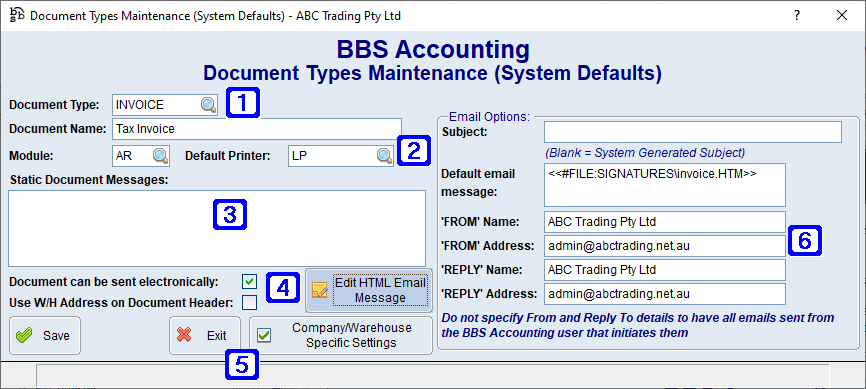
DocumentTypes Maintenance Screen
|
Document Type - The document type being maintained or users can click Document Name - The selected document name |
|
Default Printer - Users can change the default printer for the selected document type by clicking the |
|
Static Document Messages - User can enter static messages to be displayed on the selected document types |
|
Document can be sent electronically - When ticked the document can be sent electronically. Use W/H Address on Document Header - When ticked the warehouse address will display on document header. Edit HTML Email Message - Navigates users to the HTML Editor to edit the selected HTML email message. This button is only available when the Default email message field has a reference to a HTML file ie <<#FILE: xxxx\xxxx.html>>. Please refer to HTML Editor for more information. |
|
Email Options - Users can specify to have selected documents From and Reply To email addresses to be a specific email address instead of the BBS users email address that initiates them. |
|
Save - Saves any changes made to the selected document type Exit - Closes the screen (Any changes made will be lost if users doesn't choose Save before Exiting) Company/Warehouse Specific Settings - For systems with multiple companies, or companies that have multiple warehouses, and would like selected documents to have different settings for different warehouses, users can select a warehouse to set specific settings and static document messages.
|